
Are you getting emails or texts saying you are out of Cloud Storage?? Are they threatening to cut off access so that you will lose your pictures/content or that you payment method failed??
THESE ARE ALL SCAMS!!
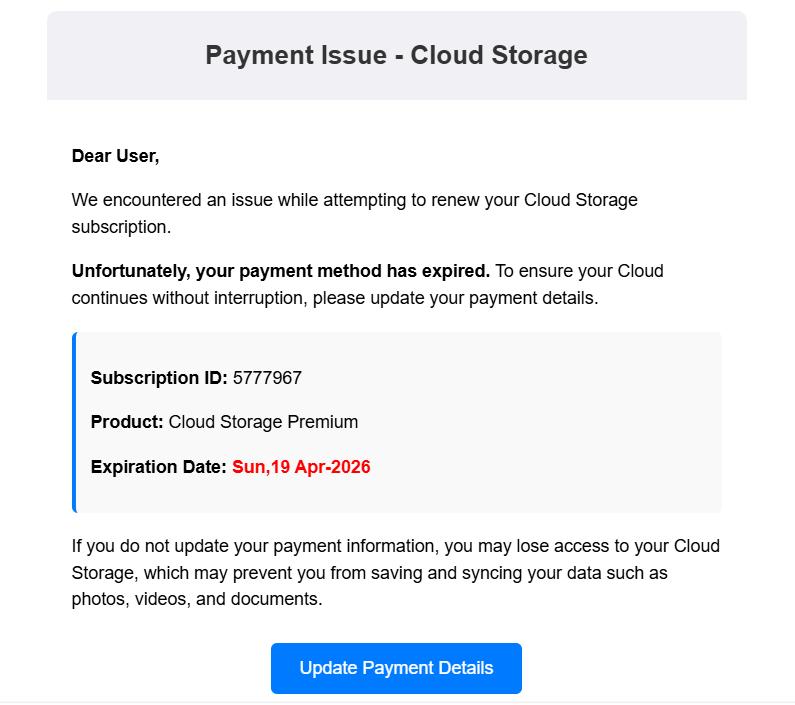
So how do you know?
1. For emails look at the senders email address (and this can be applied to all spam). It will be from some weird email address – the email above came from jrirkkmcys@xagg.tpbtmugmqrayh.us The is red flag #1.
For text messages NEVER click on a link sent in a text message! Go to the website for the supposed sender and check there.
2. The email or text will not have any personal identifying information about you other than your email or mobile number, and often will have poor grammar and typos.
3. It will always be a “MUST DO IT NOW OR ELSE” statement.
4. If it isn’t clear what “cloud storage” they are talking about —- it’s fake!
NEVER click on any links or buttons and NEVER call the number. Mark as Junk/Spam and Block the Sender.
How do you check your cloud storage?
You can always check the status of your cloud storage on your device.
Apple (iPhone, iPad, Mac computers)
Apple cloud storage is called iCloud. To check your iCloud storage usage:
- Open the Settings App (or System Settings on a Mac)
- Click on your Name
- Click on iCloud
Apple gives you 5GB of iCloud Storage for free. You can purchase more space by upgrading to iCloud+.
Reference: https://support.apple.com/guide/icloud/check-your-icloud-storage-on-any-device-mm039c13d410/icloud
Android Phones/Tablets (Samsung, Pixel, Motorola, LG, etc.) or Chromebooks
Android devices back up to your Google (Gmail) Account.
To check your cloud usage go to one.google.com/storage on a browser or open the Google One app:

Each Google Account includes up to 15 GB of storage, which is shared across Gmail, Google Drive, and Google Photos. To add to your storage quota, you can purchase a Google One membership
Reference: https://support.google.com/googleone/answer/9312312?hl=en
Windows computers
Windows 11 will usually configure backing up these user library folders – Desktop, Documents and Pictures – to their cloud storage called OneDrive.
To check your OneDrive usage open the Settings App and it will be shown on the Home Tab on Windows 11. Or go to https://onedrive.live.com/?view=1&v=managestorage on a browser. You may have to login with your Microsoft Account.
You get 5 GB of free OneDrive cloud storage for your email attachments, files and photos in OneDrive. You can upgrade to purchase additional storage.